Microsoft 365 Security
Blue Arca makes your Microsoft 365 security risks visible – in 3 clicks.
Since 2016 we’ve helped clients uncover Microsoft 365 security gaps with tools we built for them — now available to everyone.
How it works
Three clicks in the Blue Arca portal — from sign-in to a live view of your Microsoft 365 security.
-
1
Sign in
Open the Blue Arca portal and sign in with your account.
-
2
Connect with Microsoft
Link your Microsoft 365 tenant so Blue Arca can read configuration and monitor your security.
-
3
See your security
Open Microsoft 365 Security — Secure Score, MFA, Conditional Access, and what needs attention, in one place.
Your Microsoft 365 security view
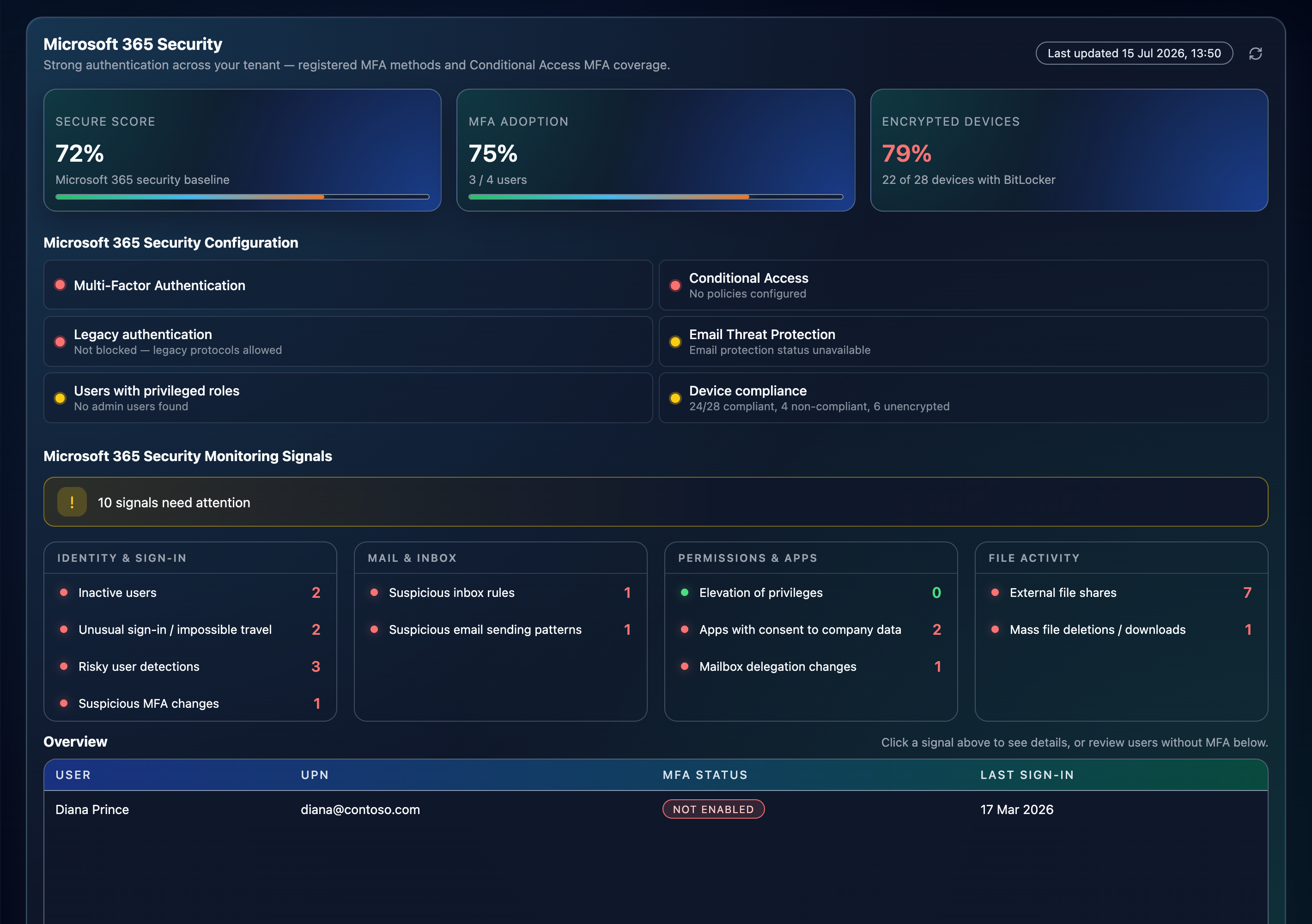
How Blue Arca reads your Microsoft 365
Get instant answers about your tenant security.
Configuration
Are the baseline controls set correctly?
See how widely MFA is adopted, whether Conditional Access is protecting sign-ins, if legacy authentication is still open, and where Microsoft Secure Score stands — a clear posture brief you can take to leadership in minutes.
Monitoring
What risky activity happened recently?
Review unusual sign-ins, suspicious MFA changes, and risky users over a defined lookback window — explained in the same plain language as the rest of our advisory.
- Read-only access Graph permissions are inspection-only. Blue Arca cannot alter your Microsoft 365 configuration or content.
- Encrypted in transit & at rest Data moves over HTTPS and is stored with encryption in Blue Arca’s secured environment.
- Data Retention We keep only what we need for monitoring and reporting, for a limited period — not an open-ended copy of your tenant.
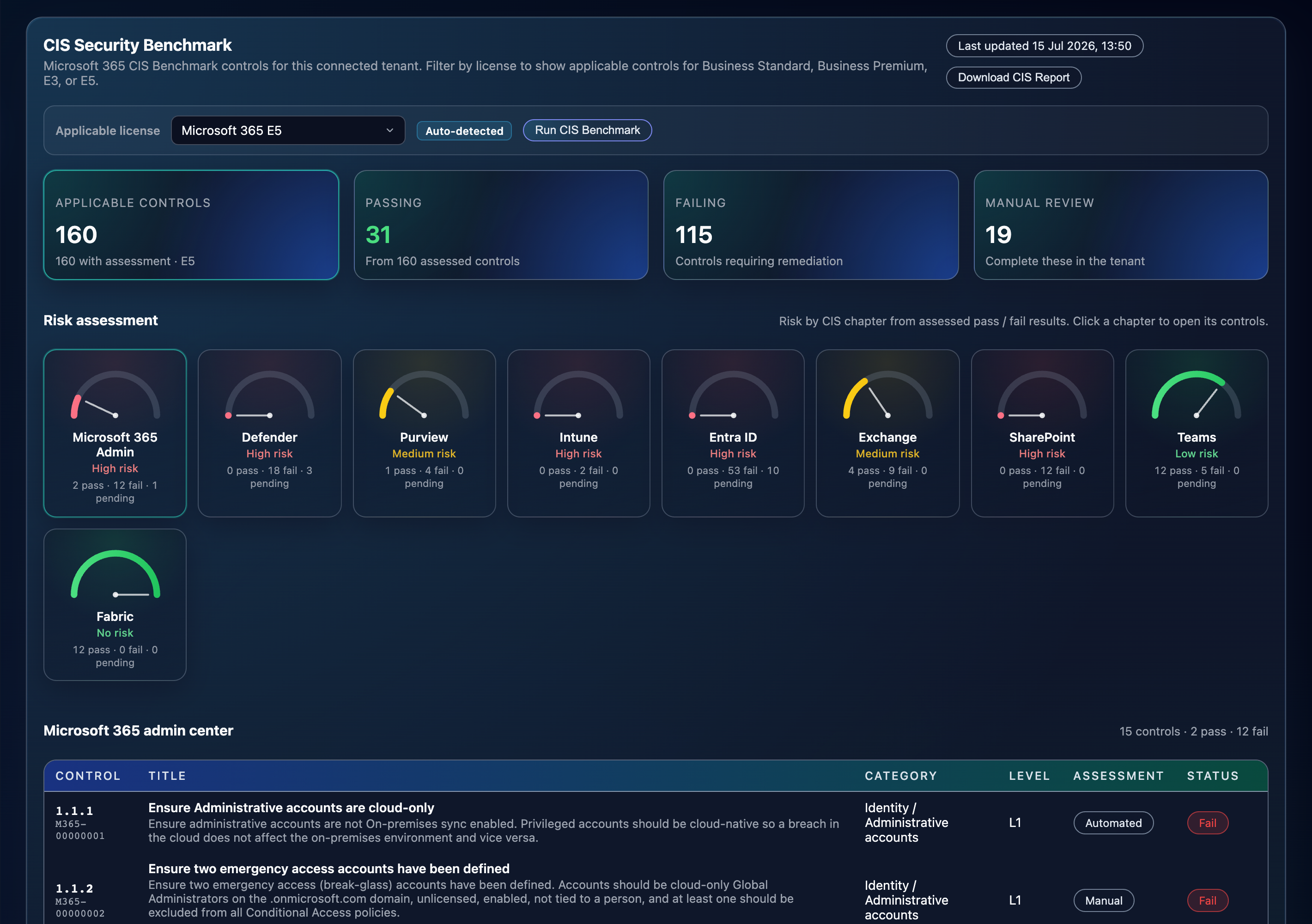
CIS Security Benchmark
Control-by-control assessment across Microsoft 365 — the deeper baseline view in the Blue Arca portal. Up to 160 checks automatically tailored to your Microsoft 365 license.
Part of Blue Arca Cybersecurity Essentials
Employee awareness, technology awareness, and cyber awareness — delivered as training, testing, and monitoring.
The Microsoft 365 view lives inside the Blue Arca cybersecurity portal, alongside phishing simulations, awareness training, dark web monitoring, penetration test findings, and more. One firm. One programme. One clear picture.
What we check in Microsoft 365
- Multi-factor authentication Who is covered, who is not with multi-factor authentication using Security Defaults or Conditional Access policies.
- Conditional Access See which Conditional Access policies are enforced or not.
- Legacy authentication Whether outdated protocols that bypass modern controls are blocked.
- Microsoft Secure Score The Microsoft security posture percentage you can track with your team over time.
- CIS Benchmark Benchmark against the CIS Security industry standards for teams that need a recognised baseline or stakeholders that need additional assurance.
- Alerts & recommendations Prioritised follow-ups when configuration or real-time security alerts need attention.
Use cases
Whether you run Microsoft 365 day to day, own security risk, or need evidence for assurance — Blue Arca gives each team a view that matches their role.
Chief Operating Officers
Get a simplified view of your complex Microsoft 365 environment and its security risks. Understand the issues that matter most, see where action is needed, and track progress without navigating multiple technical admin centres.
IT Managers
See the most important security controls of your Microsoft 365 like MFA coverage, Conditional Access, and legacy authentication at a glance — without digging through admin centres. Prioritise fixes with Secure Score and alerts, and track progress with your team over time. Stay compliant with the CIS Benchmark.
Security Officers
Monitor risky sign-ins, MFA changes, and user risk on an ongoing basis. Get one place for configuration gaps, real-time security signals, and prioritised follow-ups when something needs attention.
Compliance Officers and Auditors
Benchmark Microsoft 365 against CIS Security industry standards with control-by-control pass, fail, and manual-review evidence. Demonstrate compliance and control effectiveness to internal and external stakeholders.
Pricing
Microsoft 365 Security Essentials
From
190 USD
- The most essential M365 security controls in one place
- Real-time monitoring and alerts
- 3-click setup
- Comprehensive compliance reporting
- Licence auto-detect
- Independent view from your MSP
Microsoft 365 CIS Security
From
490 USD
- Microsoft 365 Security Essentials
- Benchmark up to 160 security checks
- Compliant with the CIS industry standard
- Continuous monitoring
- In-depth compliance report
- Detailed step-by-step risk mitigation guidance
- Automated reporting
Frequently asked questions
Common questions about access, permissions, and what you see in the Blue Arca portal.
What is Blue Arca Microsoft 365 Security?
Blue Arca Microsoft 365 Security is a simplified view of your Microsoft 365 security posture inside the Blue Arca portal. We determine configuration gaps, monitor security signals, report on Secure Score, and perform CIS Benchmark checks in one place.
What do you mean by “3 clicks”?
1. Sign in to the Blue Arca portal, 2. Connect your Microsoft 365 tenant, 3. Grant required read-only permissions. The Microsoft 365 Security Portal with insight into your tenant’s security appears immediately.
Can Blue Arca change anything in our Microsoft 365 tenant?
No. We use read-only Microsoft Graph permissions — enough to assess posture, not enough to change mail, users, or security settings in your tenant. For the CIS Security Benchmark we use additional Exchange Online and Teams roles to read your Microsoft settings.
What do you see after we connect?
You will have access to the Microsoft 365 Security Monitoring Page with insight into your organisation’s MFA adoption, Conditional Access, current legacy authentications, Microsoft Secure Score, and recent security signals. Your tenant is monitored on new security signals immediately after connecting.
What is the difference between Microsoft 365 Monitoring and the CIS Benchmark?
Microsoft 365 Monitoring is your day-to-day security view: MFA coverage, Conditional Access, legacy authentication, Microsoft Secure Score, and recent risky activity — so you can see posture and what needs attention now.
The CIS Security Benchmark is a deeper, control-by-control assessment against CIS industry standards (up to 160 checks, tailored to your Microsoft 365 licence). Use Monitoring for ongoing visibility; use CIS when you need a recognised baseline or extra assurance for stakeholders.
How is our data protected?
Your data moves over encrypted HTTPS and is stored encrypted in Blue Arca’s secured environment in Switzerland. We keep only what we need for monitoring and reporting, for a limited period — not an open-ended copy of your tenant.
Who is this for?
COOs, IT managers, Security Analysts, and teams that want Microsoft 365 security risks visible immediately and continuously, against minimal costs.
How does the 14-day free trial work?
You get full access to all features on your selected plan for 14 days. At the end of the trial, you can choose to subscribe or your account will simply pause. No surprise charges, no auto-billing without your consent.
Work with Blue Arca
Speak with our team to request free 14-days trial — or open the portal if you already work with us.
Request a free trial
Fill in this form and we’ll set up your 14-day free trial of Blue Arca Microsoft 365 Security.